
DNS Evolution and Flow
An attempt to explain DNS to humans

How do two computers interact in the wild internet jungle? They need IP Addresses. Humans, on the other hand, are bad at remembering names, let alone a long string of numbers! To mitigate this, we use short, human-friendly names like x.com to reach the websites/hosts we want and a system in the background that maps names to the IP addresses.
Ever wondered what happens behind the scenes when you hit a website, e.g drive.google.com from your computer? Before any connection to be made, we need a system to find the IP address of the server, it is a crucial part of the modern internet. The system is called DNS (Domain Name System). Let’s embark on a journey through DNS from the early 80s, exploring how it was before & how we arrived at our current state in 2026. So, buckle up your seatbelt!
Initial DNS system
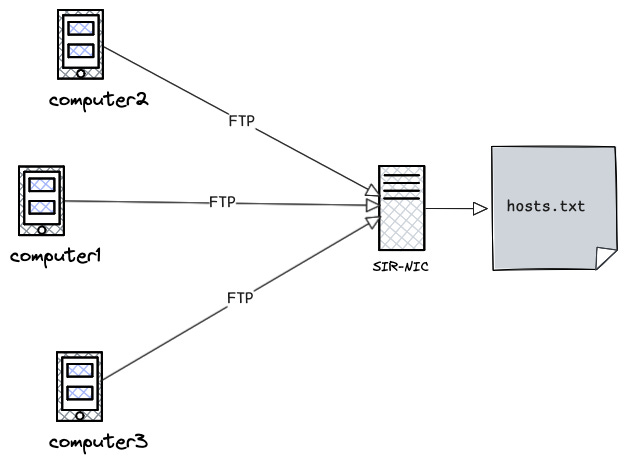
Back in the 1970s, the internet as we know today didn’t exist. There was something called ARPANET. It had a limited number of mainframe computers connected to each other. If a person at MIT wants to send a file (FTP) or email it to a colleague, their computer has to have an entry of the colleague’s computer’s IP address.It was maintained in a a host table, a file called hosts.txt.
It was a very simple text-formatted file, containing flat names like this.
;GIDNEY::<PAETZOLD.ARPANET>HOSTS.TXT.4, 25-Mar-85 13:56:55, Edit by PAETZOLD
;local stuff

; DoD Internet Host Table
; 22-Mar-85
; Version number 436

; Changes, corrections, comments or questions to (HOSTMASTER@SRI-NIC); The format for entries is:
; NET : NET-ADDR : NETNAME :
; GATEWAY : ADDR, ADDR : NAME : CPUTYPE : OPSYS : PROTOCOLS :
; HOST : ADDR, ALTERNATE-ADDR (if any): HOSTNAME,NICKNAME : CPUTYPE :
; OPSYS : PROTOCOLS :

HOST : 10.0.0.51 : SRI-NIC,NIC : DEC-2060 : TOPS20 : TCP/TELNET,TCP/SMTP,TCP/FTP :

HOST : 10.2.0.6 : MIT-AI,AI,MITAI : DEC-KS10 : ITS ::

HOST : 10.0.0.78: UCB-ARPA,UCBARPA : VAX-11/780 : UNIX :
TCP/TELNET,TCP/FTP,TCP/SMTP,UDP :

GATEWAY : 26.0.0.26: PENTAGON-TAC : C/30 : TAC : TCP :
The file was manually maintained by Network Information Center (SRI-NIC) at Stanford. Imagine if a new compute gets added, they had to email HOSTMASTER@SRI-NIC with their ip-addresses and other details.
This was a problematic for many reasons
Bottleneck due to centralisation: The host table was centrally manually maintained
Latency: Others have to FTP the file regularly into their system to talk to anyone else.
Scale: Large host files were too slow to copy & parse for the computers
Legacy system
So how’d you solve it ? Sharding and making this into a smaller problem is the way to go. Lets look into the details.
Design Improvements
Ask for the host-ip mapping instead of maintaining everything.
Maintain single source of truth & automatically update it everywhere else.
Split the database across thousands of servers as syncing the large database would be expensive & time-consuming.
When the entry is not with you, you need to ask someone, typically a server, who they called it as Nameserver. Nameservers are the servers that manage the parts of the domain for which they have complete information. A nameserver is in charge of a defined part of the DNS hierarchy. It stores all the official records for that part; the unit is called a zone, and when a subdomain is managed elsewhere, it points clients to the other nameservers that handle it.
Now somebody needs to interpret the information from the nameservers, they called it a Resolver. Resolvers must be able to access at least one of the nameservers (usually ip address). Sometimes a nameserver can act both a resolver and a nameserver.
To make it possible to spread the DNS database across thousands of servers around the world, DNS uses a structure called the domain name space. It’s organised like a tree: each node in the tree has a name, called a label, and can branch out into zero or more child nodes. Just the label or each node has no real meaning to the user. The path from a node to the root defines a domain name.
Domain Vs Zone
The terms domain and zone could be confusing. A zone is a portion of a domain, for ease of administration. Whereas domain is a hierarchy of labels, as explained above. Zone can be pictured like below.
.                    <- root zone
└── com.             <- zone
    └── google.com.  <- zone
        └── drive.google.com. (part of google.com)
Modern Domain Name System
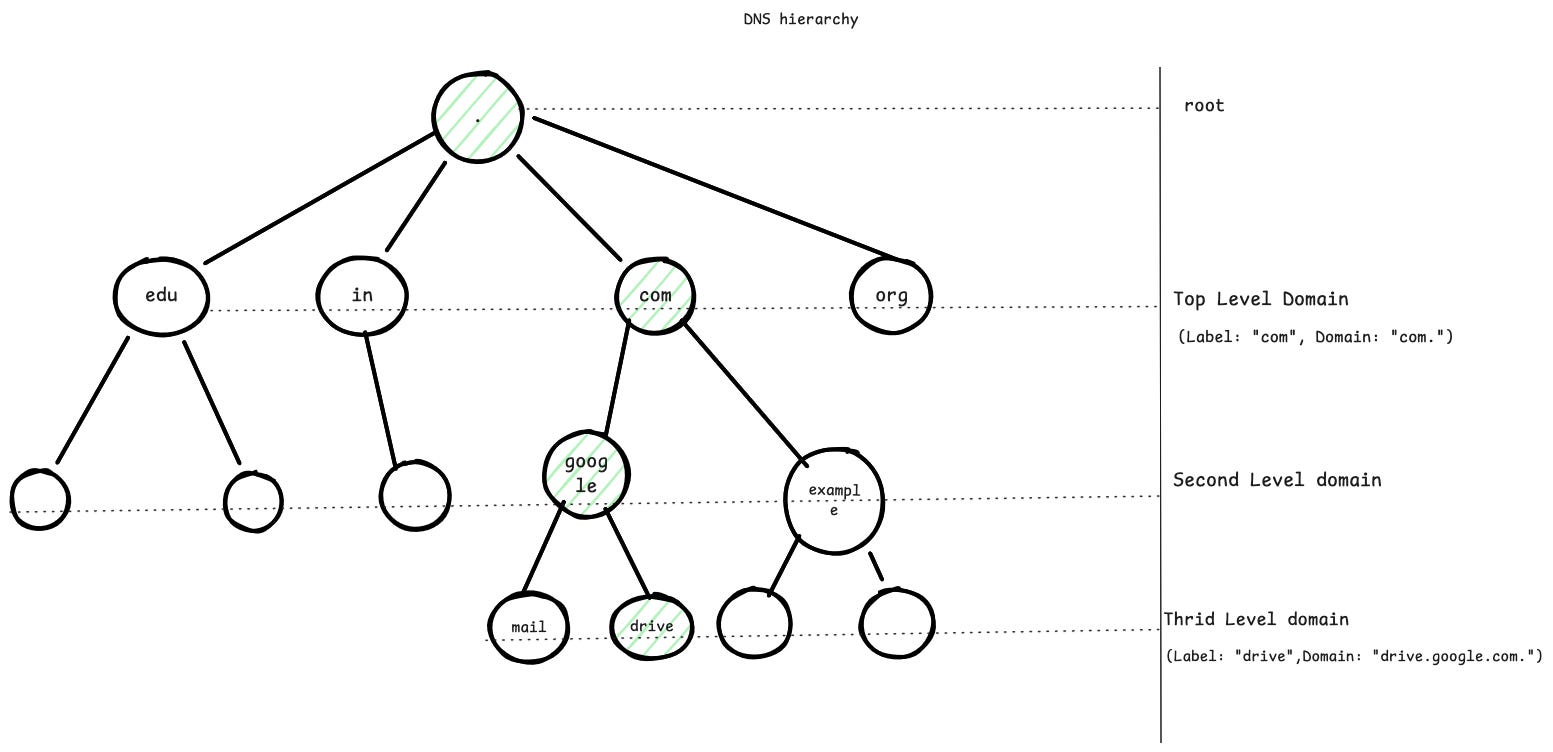
You may ask why tree structure and not other data structures ? Tree structure provides an administrative sharding/delegation. Once you have google.com, Google can independently manage hosts for various features like drive.google.com, mail.google.com independently, without asking the root. A tree allows just that. If you see, in this case , .com is managed by someone & drive.google.com. managed by someone else, i.e some other nameserver & admins. Imagine if it was a distributed hashmap, the management would have been difficult, you can’t definitely say a subdomain is managed by a particular company, as hashmaps distribute keys uniformly. DNS is for humans, so its optimised for delegation, not lookup.
To understand it better real world analogy, The old host table system was like a single receptionist in a massive office building trying to memorise the employee ID/Phone number of every single employee. Every time a new hire started, someone had to tell the receptionist. The DNS Hierarchy is like a corporate directory hierarchy. The receptionist (Root) only needs to know who manages the Engineering department (TLD). The Engineering manager knows where an intern sits.
DNS Flow
So what actually what happens when you hit a website let’s say drive.google.com in your browser ?
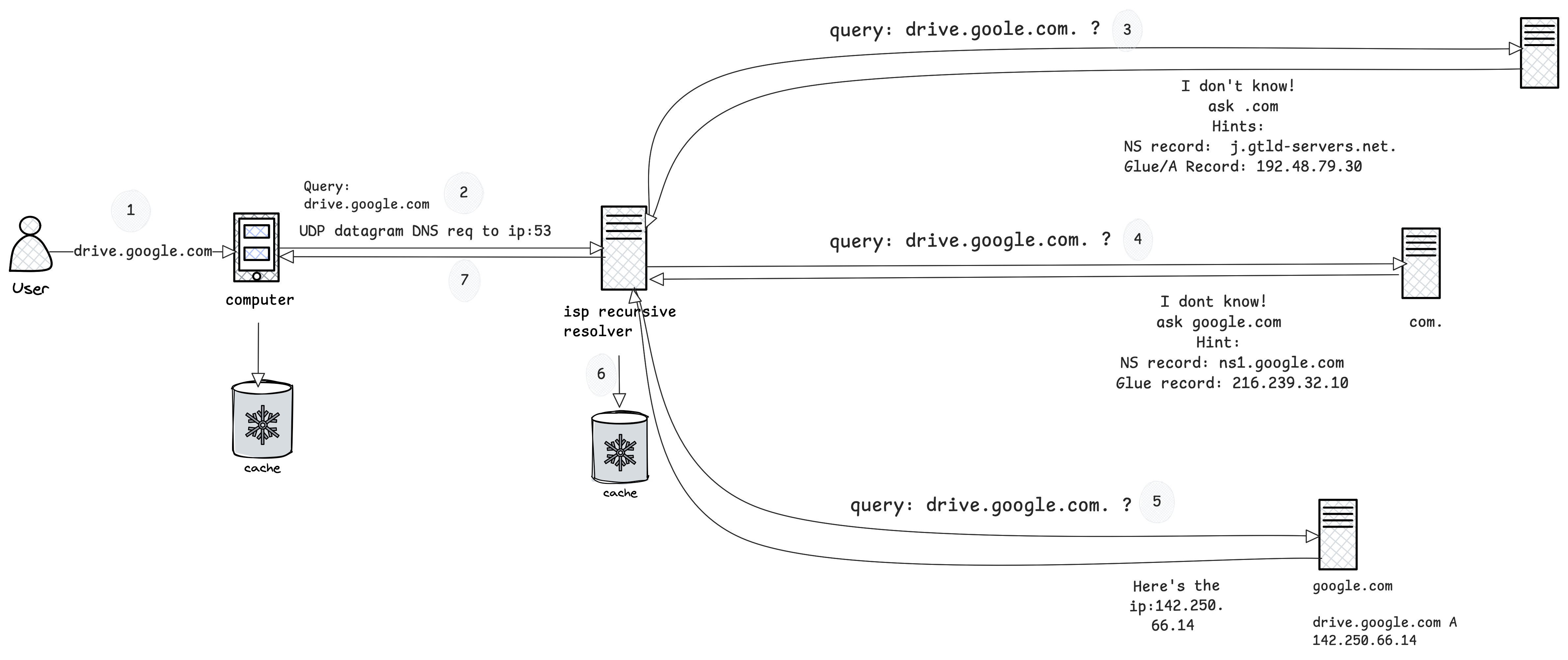
When you hit drive.google.com on the browser, it doesn’t talk to DNS servers directly. It simply calls a function.
int getaddrinfo(const char *restrict node,
                const char *restrict service,
                const struct addrinfo *restrict hints,
                struct addrinfo **restrict res);
Stub Resolver running in your computer acts upon it. It sends a UDP/TCP datagram request to the remote resolver with the RD bit set(Asking for recursion). It doesn’t send drive.google.com as a string, its a collection of length-prefixed labels to match the tree structure.
DNS Query
---------
Header:
  ID = 0x3a7f
  RD = 1

Question:
  QNAME  = [05]drive[06]google[03]com[00]
  QTYPE  = A
  QCLASS = IN
Wait, Where does the stub resolver find the resolver IP ? Its usually under /etc/resolv.conf. Content may look like.
cat /etc/resolv.conf

nameserver 1.1.1.1
ISP Resolver or Public resolver like 1.1.1.1. Checks in its cache, can’t find it initially.
Asks root do you have the ip for drive.google.com. ? RD will not be set.
There’s usually . at the end, since it always indicates root, we dont usually mention it.
A question arises here, How does the ISP resolver know how to reach the root , i.e . ? Usually the resolver softwares like Bind, Unbound etc contain the root servers IP. These root IPs rarely change, also it comes with the DNSSEC root trust anchors. So you trust them. DNSSEC is a topic for another day.
The root servers are responsible for . and its immediate children, it replies with referals, com nameservers in this case with additional glue record mentioning it’s IP.
	Referral:
               com. NS a.gtld-servers.net
          Additional(glue):
	      n.gtld-servers.net A 192.5.6.30
Obvious question, why glue records are needed ? The name server a.gtld-servers.net it’s not part of the com tree, so com delegates the responsibility to another nameserver. But we cant return just this to the resolver, it’d be stuck in circular dependancy. Hence glue record in additional section is returned. Using the glue-provided IP address resolver knows where to find the next delegation, in this case com’s nameserver. This process recursively gets repeated till it reaches the target domain, ns1.google.com.
The nameserver ns1.google.com contains the actual web server’s IP. These entries are called zone’s Resource Records. If there’s no resource record, ANSWER section would be empty and resolution would end up in failure with NODATA. NXDOMAIN error is returned when authoritative server can’t find the node in the DNS tree within its zone.
Resolver verifies the authority of the domain and updates its cache with the IP of the domain/zone and returns the response to client
Stub resolver in your computer caches the IP of drive.google.com.
The DNS response received by the resolver would conceptually look like this.> dig drive.google.com @ns1.google.com ; <<>> DiG 9.10.6 <<>> drive.google.com @ns1.google.com ;; global options: +cmd ;; Got answer: ;; ->>HEADER<<- opcode: QUERY, status: NOERROR, id: 27710 ;; flags: qr aa rd; QUERY: 1, ANSWER: 1, AUTHORITY: 0, ADDITIONAL: 1 ;; WARNING: recursion requested but not available ;; OPT PSEUDOSECTION: ; EDNS: version: 0, flags:; udp: 512 ;; QUESTION SECTION: ;drive.google.com. IN A ;; ANSWER SECTION: drive.google.com. 300 IN A 142.250.66.14 ;; Query time: 59 msec ;; SERVER: 216.239.32.10#53(216.239.32.10) ;; WHEN: Wed Jan 14 12:02:42 IST 2026 ;; MSG SIZE rcvd: 61
The highlighted ANSWER section says its an A record (Address record, one of the Resource Records) type and has what we’re looking for. You can see this DNS journey on your computer by running the below command, something I’d like you to try out!
dig drive.google.com +traceFinally, IP is obtained! HTTPS request is made to the actual server, after the SSL handshake, you will see your files :) There’s an excellent blog by Hussein Nasser about the internet routing, do read.
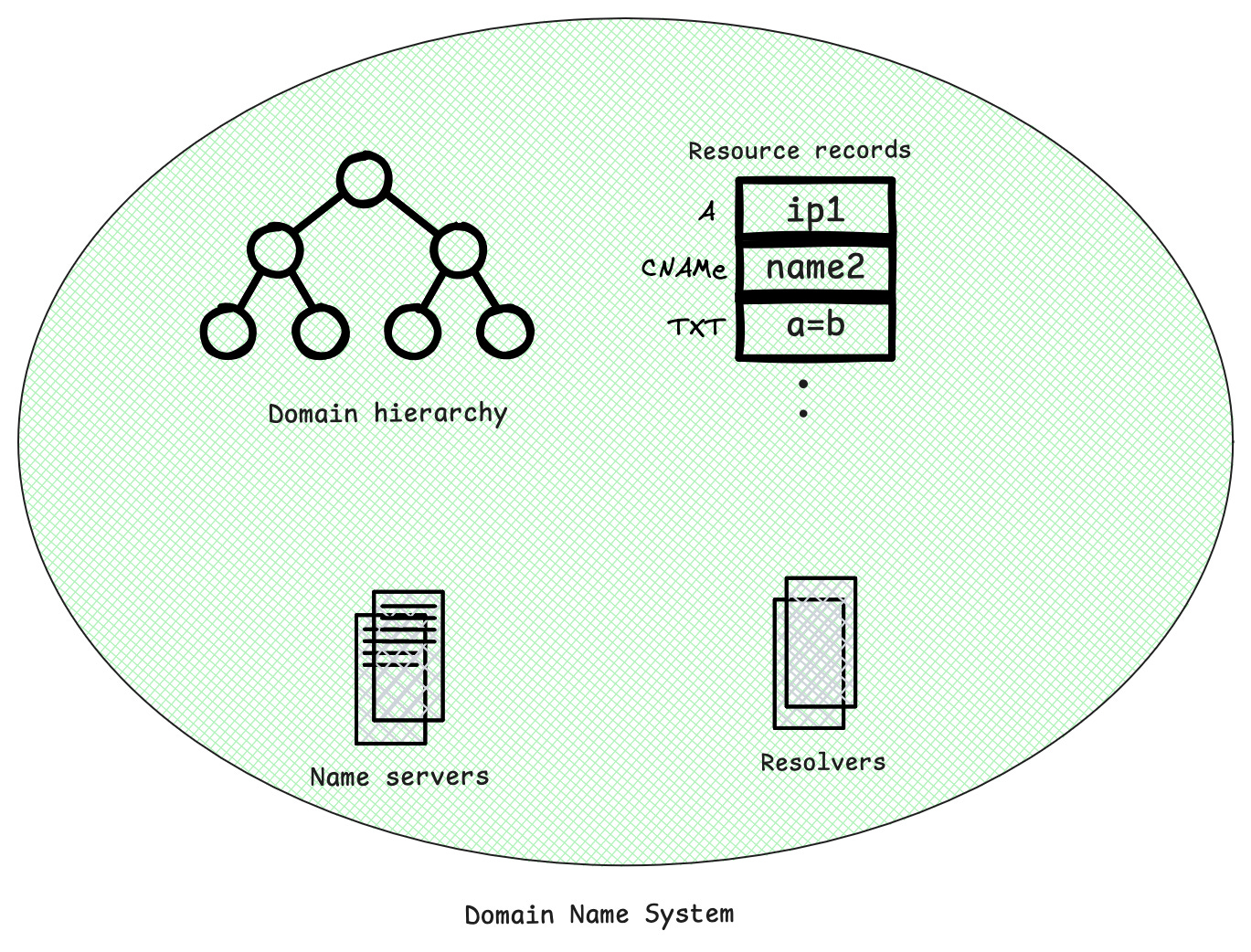
The modern domain name system broadly consists of the following components.
Stay tuned for next part where will discuss how DNS updates happen & DNS security aspects.